You are not logged in.
addiesam AE Family Offline #1 2019-12-04 18:16:11
3 - First Python Program by using Jupyter Notebook
Startup Python editor
1. Start "Anacoda".
Linux:
~/tools/anaconda3/bin$ ./anaconda-navigator
2. Launch "Jupyter Notebook".
3. Click "New" --> "Python 3".
4. Write program on the cell and press "Ctrl" "Enter" to compile and run the program.
addiesam AE Family Offline #2 2019-12-04 22:11:41
Re: 3 - First Python Program by using Jupyter Notebook
Write a simple program
1. On the cell, write
print('Hello World!')
2. Press "Ctrl" "Enter".
3. On the new cell, write
print(1+1)
4. Press "Ctrl" "Enter"
addiesam AE Family Offline #3 2019-12-04 22:15:14
Re: 3 - First Python Program by using Jupyter Notebook
More than programming
Markdown is a lightweight, easy to learn markup language for formatting plain text. Its syntax has a one-to-one correspondance with HTML tags, so some prior knowledge here would be helpful but is definitely not a prerequisite. Remember that this article was written in a Jupyter notebook, so all of the narrative text and images you have seen so far was achieved in Markdown. Let’s cover the basics with a quick example.
http://w.tkolp.com/data/addiesam/Python … _cells.pdf
--------------------------------------------------------------------------------
self study:
https://jupyter-notebook.readthedocs.io … index.html
addiesam AE Family Offline #4 2019-12-04 22:32:38
Re: 3 - First Python Program by using Jupyter Notebook
Literate programming
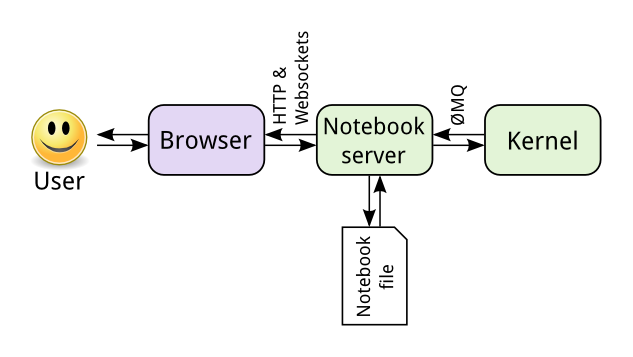
这个中心点是 notebook server. 你通过浏览器来连接notebook这个渲染好的网页应用. 你写的代码通过server传给kernel。 kernel执行代码再通过server传给浏览器。当你保存文件为.ipynb后缀的JSON 文本 。
这种架构最好的特点是kernel可以不是基于特定于Python的,你可以运行任何语言。 例如你也可以运行R和 Julia 。所以jupyter不再叫Ipython Notebook。 Jupyter 是 Julia, Python, 和 R的组合. 如果你感兴趣,你可以浏览这个 支持的kernel列表.
另外一个好处是你可以通过网络在任何一个地方访问Server。特别的是,你可以在自己的电脑上访问数据存储的地方并运行代码。 你可以在一个远程服务器上执行代码 。
addiesam AE Family Offline #5 2019-12-04 22:50:25
Re: 3 - First Python Program by using Jupyter Notebook
Target - Build a financial report
1. Download the .zip file.
http://w.tkolp.com/data/addiesam/Python … master.zip
2. Extract the .zip file.
3. Run .ipynb file on the Jupyter Notebook via web browser.